Domain settings
The Settings tab is where you manage the settings for your domain in CookieHub. It is divided into sections: General, Consent storage, Regional Settings, Languages, Categories and, for domains using an IAB TCF policy framework, IAB TCF.
General
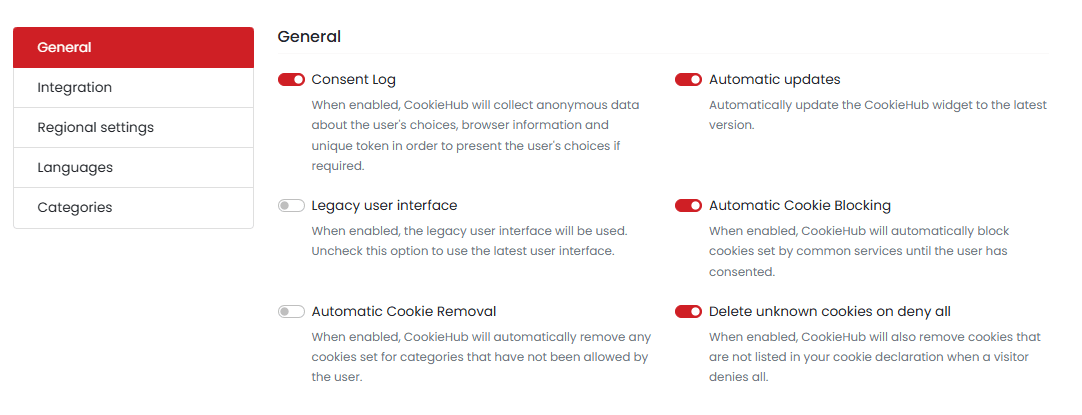
In the General section, you can enable or disable general settings for your domain. This includes options such as:
- Consent Log: When enabled, CookieHub will collect anonymous data about the user’s choices, browser information, and unique token in order to present the user’s choices if required.
- Automatic Updates: Automatically update the CookieHub widget to the latest version.
- Legacy user interface: When enabled, the consent dialog uses the legacy CookieHub interface. Leave it unchecked to use the current interface, which is the recommended setting.
- Automatic Cookie Blocking: When enabled, CookieHub will automatically block cookies set by common services until the user has consented.
- Automatic Cookie Removal: When enabled, CookieHub will automatically remove any cookies set for categories that have not been allowed by the user.
- Delete unknown cookies on deny all: When enabled, CookieHub will also remove cookies that are not listed in your cookie declaration when a visitor denies all.
Cookie removal
Two settings control cookie removal, and they do different things. This is the most common source of confusion, so it is worth being precise about which one does what.
| Setting | What it controls |
|---|---|
| Automatic Cookie Removal | Whether removal runs on page load |
| Delete unknown cookies on deny all | Whether undeclared cookies are removed when a visitor allows nothing |
Turning off Automatic Cookie Removal does not stop cookies being deleted on deny all
Removal always runs at the moment a visitor answers the consent dialog, whether or not Automatic Cookie Removal is enabled. That setting only governs removal on page load.
If you need undeclared cookies to survive a deny all, the setting you want is Delete unknown cookies on deny all.
What gets removed
A declared cookie is one listed in your cookie declaration. An undeclared cookie is one CookieHub finds in the browser that is not in your declaration.
| The visitor has | Declared cookies | Undeclared cookies |
|---|---|---|
| Allowed nothing beyond Necessary. Deny all, a saved selection with nothing above Necessary, or no answer yet | Removed, except those categorized as Necessary | Removed, unless Delete unknown cookies on deny all is unchecked |
| Allowed some categories and denied others | Removed for the categories not allowed | Not touched |
The row that surprises people: an undeclared cookie survives a partial selection but not a deny all. If you want both to behave the same way, uncheck Delete unknown cookies on deny all.
CookieHub’s own consent cookies are never removed.
When removal runs
- Whenever a visitor makes or changes a choice. Always, whether or not Automatic Cookie Removal is enabled.
- When CookieHub loads on a page. Only while Automatic Cookie Removal is enabled. Once as CookieHub loads, then again two seconds later, to catch cookies written while the page was still loading.
Visitors who have not answered yet count as having allowed nothing
The first row of the table above applies to a visitor before they interact with the dialog at all. On a domain with Automatic Cookie Removal enabled, that means their undeclared cookies are removed on every page view until they answer.
This matters most on pages that set a cookie the visitor needs before they consent, such as an authentication or security cookie on a login page. If you have one of those, uncheck Delete unknown cookies on deny all or categorize the cookie as Necessary.
The two settings in detail
Automatic Cookie Removal
Controls whether CookieHub removes cookies on page load. While enabled, CookieHub removes cookies in categories the visitor has not allowed each time it loads on a page, and again two seconds later.
Disabling it stops the removal that runs on page load. It does not stop the removal that runs when a visitor responds to the consent dialog.
Delete unknown cookies on deny all
When a visitor has allowed nothing beyond Necessary, CookieHub removes undeclared cookies along with the declared ones. This setting is the opt-out from that behavior. Unchecking it leaves undeclared cookies alone, both on deny all and on page load.
It is enabled by default, on new and existing domains alike, so nothing changes unless you uncheck it.
Uncheck it if undeclared cookies on your website need to survive: authentication, security or functional cookies, particularly ones set on pages a scan does not reach. Categorizing a cookie as Necessary in Cookies & Services also keeps it, and is the better option when you know which cookie you need to protect.
This setting requires CookieHub 2.9.2 or newer. The option is not shown for domains running an older widget version. It belongs to the Automatic Cookie Removal feature, so it can only be changed on subscriptions that include it.
Consent storage
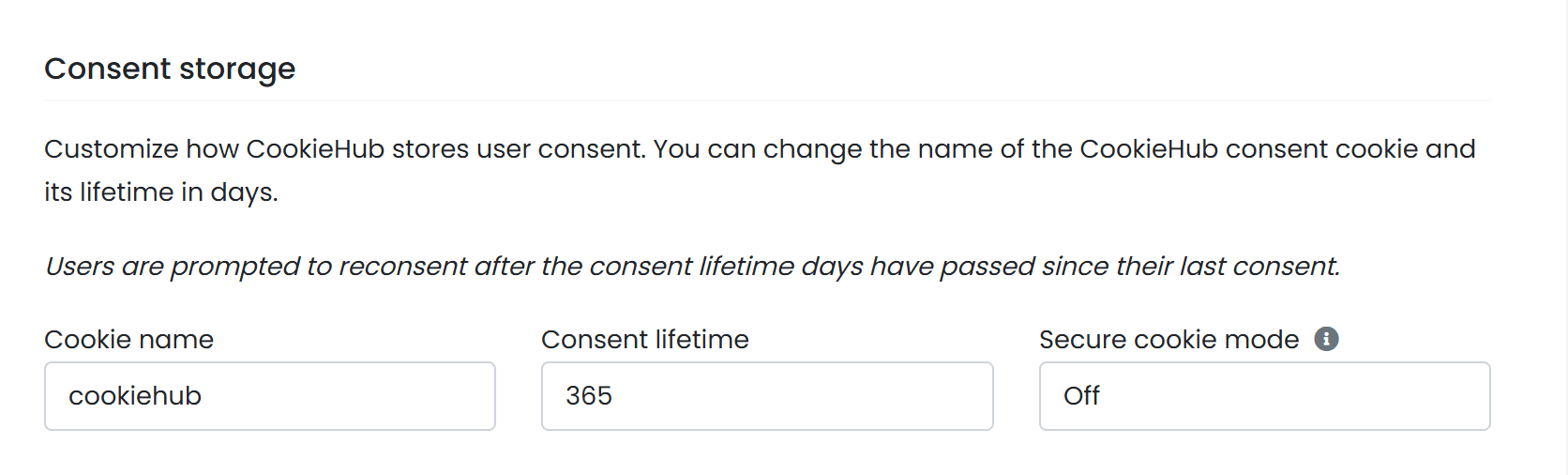
This section allows you to customize how CookieHub stores user consent. You can change the name of the CookieHub consent cookie, its lifetime in days and whether the Secure attribute is added to the cookie. By default, the consent cookie is named cookiehub, has a lifetime of 365 days and no Secure attribute.
Users are prompted to reconsent after the consent lifetime days have passed since their last consent. This means that if a user gave consent to cookies on your website and the consent lifetime is set to 365 days, they will be prompted to give consent again after 365 days have passed. This is to ensure that users have control over their data and can change their preferences over time.
Cookie name
The consent cookie is named cookiehub by default. Change it if the name conflicts with an existing cookie on your website or if your naming conventions require a different name.
A custom cookie name affects implementations using the CookieHub Google Tag Manager template. The stored consent state becomes available later in the page lifecycle, which can change when consent-dependent tags fire.
The CookieHub template reads the consent cookie while the Consent Initialization - All Pages trigger runs, which is what makes the stored consent state available before Page view tags execute. The template reads the default cookie name, cookiehub, at this stage.
With a custom cookie name, the stored consent state is not available at that point. It becomes available when the cookiehub_consent_update event is published instead. Tags that depend on consent should therefore use cookiehub_consent_update as a firing trigger, combined with the appropriate Additional Consent Checks, rather than relying on Page view alone.
cookiehub_consent_update is published whenever cookiehub_modified is published. Using both as firing triggers on the same tag can cause the tag to fire twice.
Cookie blocking and consent enforcement are unaffected by the cookie name. Only the point at which the stored consent state becomes available in the data layer changes.
For the full configuration steps, see Custom consent cookie name.
Secure cookie mode
This setting controls whether CookieHub adds the Secure attribute to the consent cookie. Browsers only send cookies carrying the Secure attribute over HTTPS connections.
Three modes are available:
- Off — the
Secureattribute is not added. This is the default. - Auto — the
Secureattribute is added when the page is served over HTTPS. - Force — the
Secureattribute is always added, including on pages served over HTTP. The browser does not send the cookie back on those pages, so consent does not persist and the consent dialog reappears on every page view.
For most production websites served over HTTPS, Auto is the recommended mode. Only use Force if the website is not accessible over HTTP at all.
Auto and Force require CookieHub 2.9 or newer. Domains running an older widget version behave as if the mode is set to Off, which is the default, so existing domains are unaffected by the setting being introduced. See the CookieHub 2.9 release notes for details.
Regional settings
Customize CookieHub’s behavior and policy frameworks based on the location of your website’s visitors.
More information about regions
Languages
In the Languages section of the Settings tab, you can configure the language settings for your CookieHub widget.
More information about languages
Categories
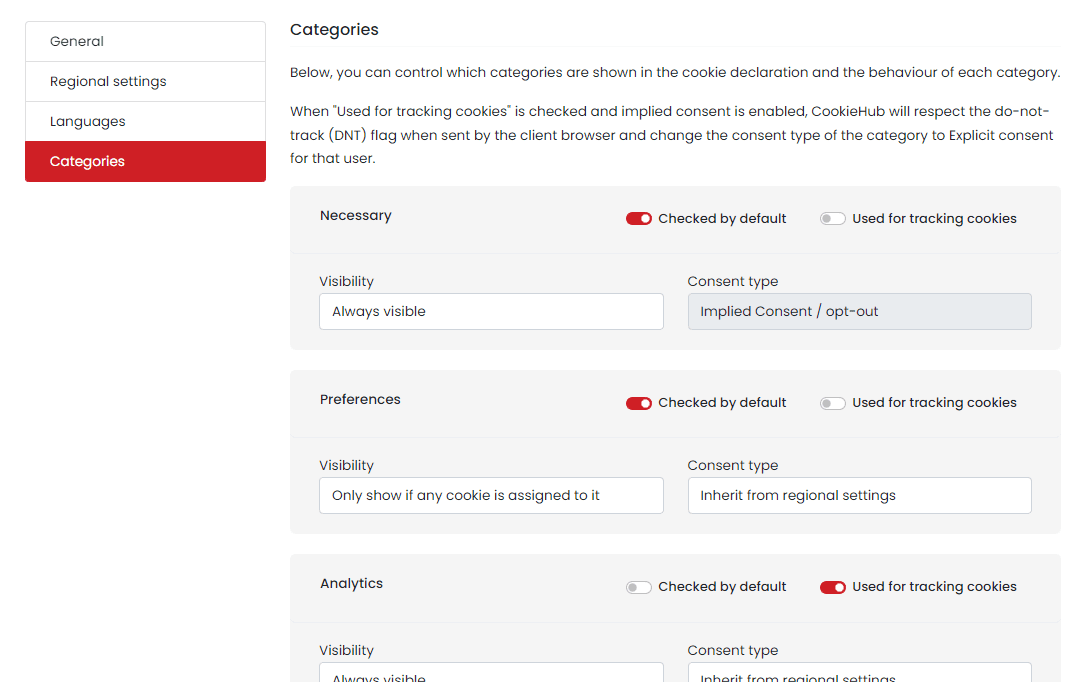
In the categories section, you can configure default settings for all categories in CookieHub. These settings can then be overridden for specific regions from the regional settings section or in the Customize dialog.
The following settings can be customized for each category:
- Checked by default: This sets the default checkbox state for the category when the user hasn’t yet consented.
- Used for tracking cookies: If this is checked, CookieHub will override the “Checked by default” state and set it to unchecked if the user’s browser sends the “do-not-track” flag.
- Visibility: This setting controls how to determine whether to show the category or not. It can be set to “Always visible”, “Always hidden”, or “Only show if any cookie is assigned to it”.
- Consent type: By default, CookieHub will use the consent type specified for the region. However, this can be overridden here to always use “Implied consent / opt-out”.
IAB TCF
Settings for regions where IAB TCF is the policy framework: which vendor list your consent dialog offers, how it treats vendors’ legitimate interest claims, and which purposes, special features and stacks it presents. This section appears once at least one region on the domain uses an IAB TCF policy framework.