Wix Cookie Banner & Consent Management
CookieHub integrates with Wix to help your website comply with GDPR, CCPA, and other privacy regulations by managing cookie consent. You can either install the official CookieHub app from the Wix App Market for a one-click setup, or add the CookieHub implementation code manually using Wix's custom code feature.
If you are currently using Google Tag Manager, we suggest following this guideline instead: Google Tag Manager
App
The easiest way to implement CookieHub on your Wix website is by installing the official CookieHub app from the Wix App Market. Your CookieHub account and domain are created automatically through the Wix platform, the implementation code is embedded into your site's HEAD for you, and billing is handled by Wix — there is no need to add any custom code or enter a domain code manually.
Install the app
- Visit the CookieHub app in the Wix App Market.
- Click Add to Site and select the site you want to install CookieHub on.
- Follow the on-screen prompts to authorize the app.
- Select a pricing plan (see Pricing plans below). You can change this later from inside the app.
- Open the CookieHub app from your Wix dashboard to configure your consent banner.
- Publish your site to apply the changes.
CookieHub is now installed on your Wix website and will manage third-party tracking scripts automatically.
Pricing plans
When installing the app you'll be asked to choose a plan. The difference between plans is the number of monthly sessions and pages scanned included, plus a few features that unlock at higher tiers.
| Plan | Price | Monthly sessions | Pages scanned | Highlights |
|---|---|---|---|---|
| Free | Free | Up to 1,000 | 50 | Consent record-keeping, Google Consent Mode v2 |
| Starter | $7.00/month | Up to 5,000 | 50 | Proof of consent, Google Consent Mode v2 |
| Basic | $12.00/month | Up to 30,000 | 100 | Multilingual with auto-detection, pre-built customizable templates |
| Business | $35.00/month | Up to 120,000 | 1,000 | IAB TCF 2.4 Transparency & Consent, remove CookieHub branding |
You can upgrade or downgrade your plan at any time directly from the CookieHub app inside your Wix dashboard. If your site exceeds its session limit for three consecutive months the consent banner is suspended until you upgrade or contact support.
Configuring the banner
After installation, open the CookieHub app from your Wix dashboard to manage your consent experience without leaving Wix. The dashboard provides:
- Cookie Scanner — request a rescan of cookies on your site and view any issues detected with your banner setup.
- Banner Appearance — choose a dialog theme (Pop-up, Overlay, Bar, or Simple), position the banner on the page, set your brand's primary color, and toggle dark mode or UI blocking.
- Consent Framework — pick the template that fits your compliance needs:
- Strict Compliance (Global Opt-in) — explicit consent for every visitor. Available on all plans.
- Global Smart Compliance — adapts the experience to the visitor's region (opt-in in the EU/UK, CCPA in applicable US states, implied consent elsewhere). Requires the Basic plan or higher.
- IAB TCF 2.4 Framework — required if you monetize with Google Ads (AdSense/AdManager) or other TCF-compliant ad networks. Requires the Business plan.
- Language — select a default language and optionally auto-detect the visitor's language (Basic plan or higher).
- Google Consent Mode v2 — toggle on when using Google Ads or Google Analytics.
- Cookie Blocker — automatically block third-party scripts until the visitor gives consent.
- Banner Preview — live preview that updates as you change settings.
Advanced configuration that is not exposed in the Wix app (custom translations, additional languages, third-party tag management, etc.) can still be done by logging in to the CookieHub dashboard using the same account.
Manual implementation
If you prefer to set up CookieHub manually using Wix's custom code feature, follow these steps:
- Follow the steps 1-4 in the Inline HTML tag section to obtain the CookieHub implementation code.
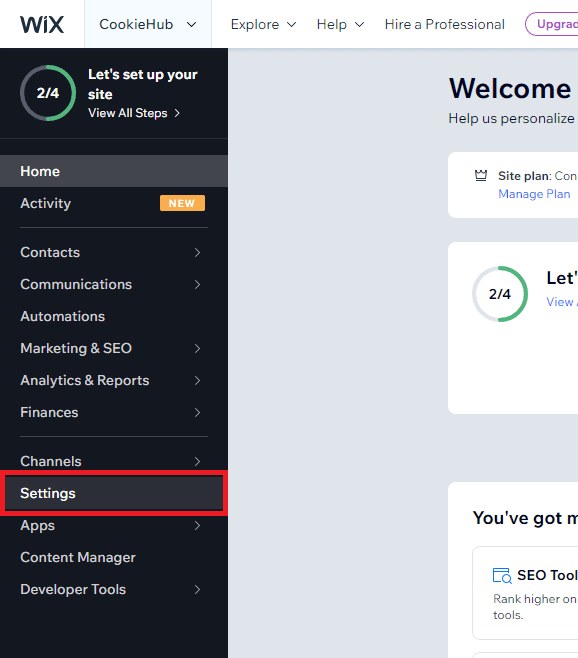
- Log in to your Wix website dashboard and go to Settings.
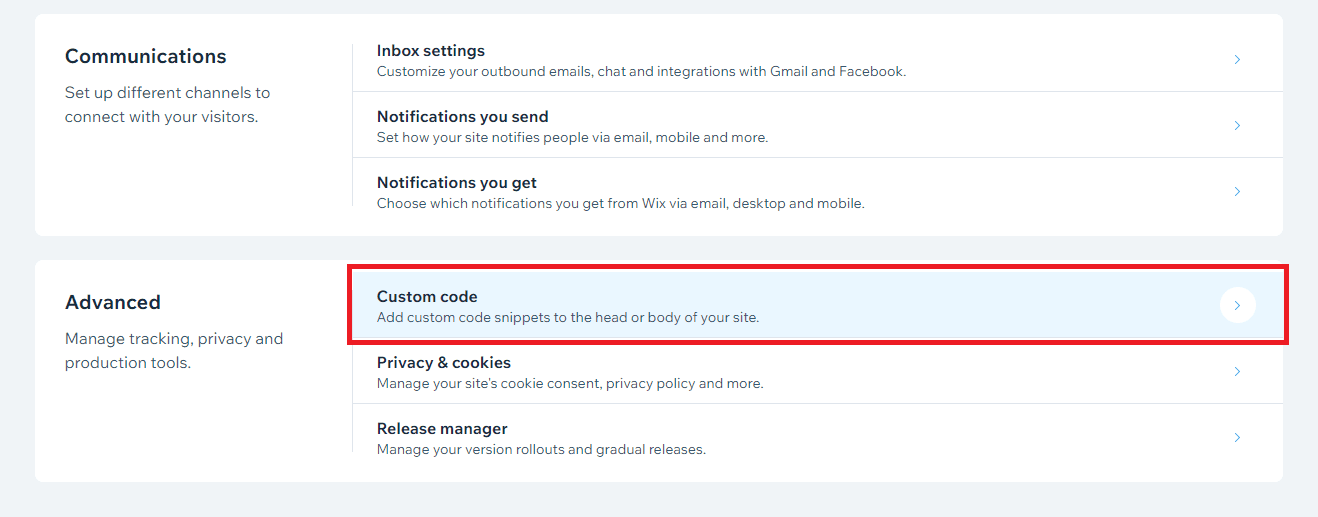
- Scroll down to the Advanced section and click on Custom Code.
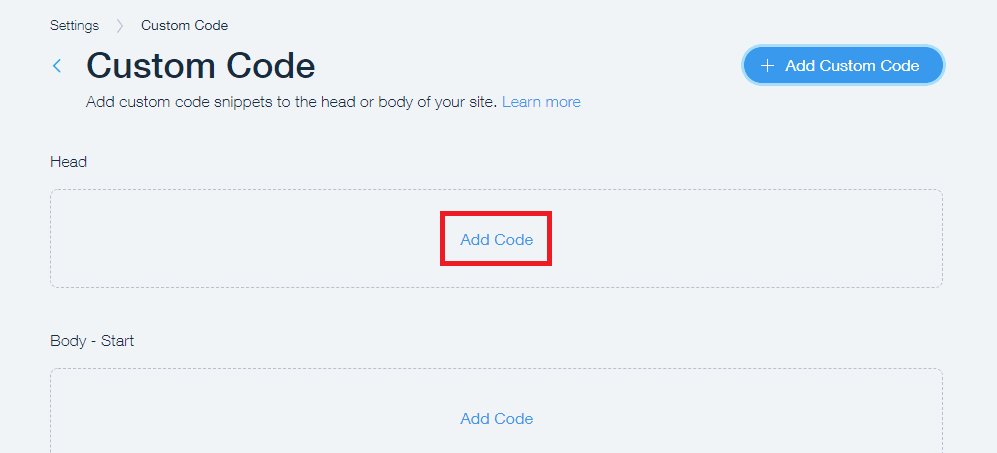
- Click on Add Code in the Head section.
- Paste the CookieHub implementation code into the first field, making sure that it is added to All pages and placed in the Head section.
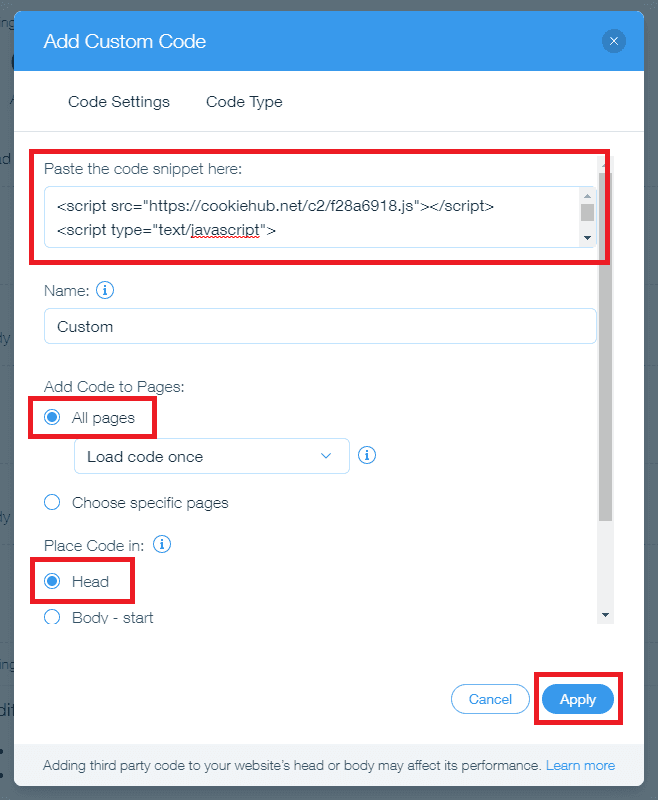
- Click on the Apply button in the bottom right corner to save the changes.
Now, CookieHub is successfully implemented in your Wix website and is managing third-party tracking scripts automatically.